CS 1.6 Autoexec & Userconfig Tuning Guide: Optimal Competitor Settings
Learn how to construct a tournament-legal autoexec.cfg and userconfig.cfg with custom crosshairs, radar optimization, and netcode binds.
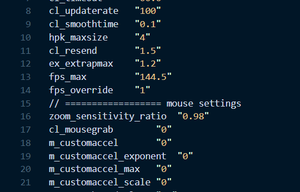
Understanding the GoldSrc Config Loading Order
When Counter-Strike 1.6 launches, it reads configuration scripts in a strict sequential order:
1. config.cfg: Created and maintained automatically by the game client (holds basic keyboard binds and menu settings).
2. autoexec.cfg: Executed once during game startup.
3. userconfig.cfg: Executed at the very end of config.cfg.
Why this matters: Never write custom cvars into config.cfg, because the game can overwrite them. Always place your competitive tweaks inside userconfig.cfg to ensure they execute with highest priority on every map change.
The Tournament Pro userconfig.cfg Template
Create a plain text file named userconfig.cfg inside your cstrike directory and paste the following:
// Mouse & Raw Input
m_rawinput "1"
m_customaccel "0"
m_filter "0"
zoom_sensitivity_ratio "1.0"
// Framerate & Display
fps_override "1"
fps_max "240"
gl_vsync "0"
cl_showfps "1"
// Netcode & Interpolation
rate "100000"
cl_updaterate "102"
cl_cmdrate "102"
ex_interp "0.01"
// Competitive Crosshair & Visuals
cl_crosshair_size "small"
cl_crosshair_color "50 250 50"
cl_crosshair_translucent "0"
cl_dynamiccrosshair "0"
cl_radartype "1"
echo ">>> Pro 2026 Userconfig Successfully Loaded! <<<"
Static vs Dynamic Crosshair (cl_dynamiccrosshair 0)
By default, the CS 1.6 crosshair expands while running and jumping to reflect bullet inaccuracy. However, an expanding crosshair distracts from precision aiming.
Setting cl_dynamiccrosshair 0 locks your crosshair size to a completely static, tight reticle regardless of movement. This allows you to pre-aim narrow angles with pinpoint accuracy.
Essential Buy Binds on the Numpad
Save critical seconds at the start of each round by adding one-key buy binds to your config:
bind "KP_HOME" "ak47; m4a1; buyammo1;"
bind "KP_UPARROW" "awp; buyammo1;"
bind "KP_PGUP" "deagle; buyammo2;"
bind "KP_5" "vesthelm; vest;"
bind "KP_END" "hegren; flash; flash; sgren;"
bind "KP_DOWNARROW" "defuser;"
Pressing Numpad 7 instantly purchases an AK-47/M4A1 with full ammo, Numpad 5 buys full Kevlar Armor + Helmet, and Numpad 1 equips all four tactical grenades.
Skip Manual Tweaks — Get the Pre-Optimized 2026 Client
All settings, Windows 11 compatibility fixes, 240Hz uncap parameters, and anti-slowhack protections covered in this guide are pre-applied out of the box in our official 170 MB setup.
Related Technical Guides
 Compatibility
CS 1.6 Windows 11 (24H2) Optimization & Crash Fix Guide
The ultimate technical guide to running Counter-Strike 1.6 flawlessly on Windows 11 and Windows 10 without crashes, input lag, or 60 FPS caps.
 Performance
How to Uncap FPS in CS 1.6 for 144Hz, 240Hz & 360Hz Monitors
Learn how to unlock the 100 FPS GoldSrc engine cap, configure fps_override, eliminate vertical sync tearing, and achieve butter-smooth high refresh rate gameplay.
 Gameplay
CS 1.6 Offline Bots Guide: Installing ZBot 1.5, POD-Bot & Navmesh Waypoints
Learn how to configure intelligent offline bots in Counter-Strike 1.6 for target practice, warmup routines, and bot navigation on custom maps.