CS 1.6 Zombie Edition
Zombie Plague 5.0 Survival Horror with Nemesis, Survivor & Laser Mines
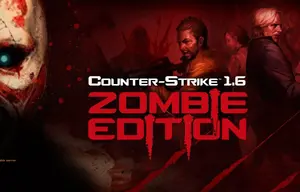
Powered by the unified CS-Down engine with 1-click in-app edition switching and automatic 10–15s mod configuration.
Zombie Plague 5.0 Survival Horror Mechanics
CS 1.6 Zombie Edition completely reimagines tactical shooter gameplay into an adrenaline-pumping survival horror experience powered by Zombie Plague 5.0. Every round begins with intense anticipation as all players spawn as humans, scrambling to find defensive positions and build barricades.
When the infection countdown expires, patient zero is randomly chosen and mutated into an infected zombie. From that moment, every human hit spreads the infection, rapidly turning the server into a desperate fight for survival.
Special Zombie Classes & Mutation Abilities
Choose your playstyle with diverse zombie mutation classes: the Light Zombie (features high movement speed and silent footsteps), the Heavy Zombie (massive health pool with heavy knockback resistance), and the Leaper Zombie (enhanced low-gravity long jumping).
Special round triggers add cinematic intensity: the Nemesis round pits an unstoppable, one-hit-kill mutant juggernaut with 50,000 HP against all humans, while the Survivor round arms a solitary human with an infinite-ammo Gatling gun.
Extra Items Arsenal, Laser Mines & Defensive Barricades
Defend yourself using specialized zombie-hunting equipment. Use ammo packs earned by dealing damage to purchase plasma rifles, dual Infinity pistols, and emergency antidotes from the in-game extra items menu (default key "J").
Deploy defensive laser tripmines on doorframes and narrow choke points using the "+setlaser" command to vaporize charging zombies before they reach your defensive perimeter.
Full Offline ZBot Navigation & Pre-Bundled Zombie Maps
No internet connection required. CS 1.6 Zombie Edition comes pre-packaged with offline ZBot support and pre-calculated navigation waypoints (.nav files) for the most popular zombie survival maps, including zm_dust2, zm_toxic_house, zm_inferno, and zm_boatescape.
Bots navigate barricades, climb ladders, and hunt humans aggressively with authentic zombie sounds and custom blood splatter particle effects.
Technical Specifications
| Engine Core | GoldSrc Engine with Zombie Plague 5.0 Mod Pack |
|---|---|
| Protocol Compatibility | Dual Protocol 47 / 48 (Connects to all Zombie Servers) |
| Client Security | Protected Config Guard with Custom Bind Preservation |
| Server Discovery | Filtered Zombie MasterServer (ZM, ZE, Biohazard) |
| Display & Refresh | 16:9 & 16:10 Widescreen with Custom Darkness Lighting |
| Offline Bot AI | Custom ZBot AI with Navigation Meshes on 30+ Zombie Maps |
| Audio Subsystem | Custom Atmospheric Ambient & Zombie Screech Sound Pack |
| Disk Footprint | 170.80 MB Setup (~800 MB Installed) |
Key Features of CS 1.6 Zombie Edition
- ✓ Zombie models
- ✓ New weapons
- ✓ Survival modes
- ✓ Custom maps
- ✓ Unique gameplay
Recommended Console Configuration
CS 1.6 Zombie Edition comes pre-configured for optimal performance. Open your in-game console (~) to view or customize these settings:
System Requirements for Windows PC
● Minimum Specifications
- CPU: 800 MHz processor (Intel or AMD)
- RAM: 128 MB RAM (256 MB recommended)
- GPU: 32 MB video card with OpenGL support
- Storage: 800 MB available hard drive space
- OS: Windows XP / Vista / 7 / 8 / 8.1 / 10 / 11
● Recommended Specifications
- CPU: 1.5 GHz multi-core processor
- RAM: 512 MB RAM or higher
- GPU: 128 MB DirectX 9 / OpenGL hardware acceleration
- Storage: 1.2 GB available storage space
- OS: Windows 10 or Windows 11 (24H2 compatible)
Quick Installation Guide
- 1. Download Setup: Click the direct download button above to retrieve
CS-1.6-Zombie-Edition-Setup.exe(170 MB). - 2. Run Installer: Launch the installer and follow the standard on-screen wizard to choose your destination directory.
- 3. Select CS 1.6 Zombie Edition: Open the client from your desktop shortcut. Select CS 1.6 Zombie Edition from the launcher menu with 1 click.
- 4. 10s Auto-Update: The client will configure the edition's custom models, sounds, and server lists automatically in 10–15 seconds.
- 5. Play Online or Practice with Bots: Click "Find Servers" to browse thousands of active community servers, or start a local match to practice offline.
Frequently Asked Questions
Can I play CS 1.6 Zombie Edition completely offline with bots? ▼
Yes! The installer includes full ZBot navigation waypoints (.nav) for all bundled zombie maps. You can start a local match and fight against AI zombie hordes without an internet connection.
How do I plant laser mines in CS 1.6 Zombie Edition? ▼
Look at a flat wall, stand close to it, and press the "V" key (bound to +setlaser). The laser tripmine will deploy and activate a lethal beam after a brief 2-second arming delay.
What is the difference between Zombie Plague and Zombie Escape? ▼
In Zombie Plague, humans barricade rooms and attempt to survive until the round timer runs out. In Zombie Escape (ZE), humans must run through an obstacle course toward an evacuation vehicle while holding off zombies.
Does this edition come with custom zombie models and sounds? ▼
Yes. It includes custom high-definition zombie character models, creepy ambient environmental sounds, zombie groans, and custom flashlight/night-vision visual effects.
Related Technical Guides
 Gameplay
CS 1.6 Offline Bots Guide: Installing ZBot 1.5, POD-Bot & Navmesh Waypoints
Learn how to configure intelligent offline bots in Counter-Strike 1.6 for target practice, warmup routines, and bot navigation on custom maps.
 Advanced
CS 1.6 FastDL & ReHLDS Server Acceleration Guide 2026
Learn how to set up lightning-fast map and sound downloads for your CS 1.6 server using sv_downloadurl, Nginx / Cloudflare FastDL mirrors, and ReHLDS.
 Support
CS 1.6 Complete Troubleshooting & Error Diagnostics Guide
Diagnose and fix all common Counter-Strike 1.6 errors including CD Key prompts, corrupted masterserver lists, missing DLLs, and black screen freezes.