CS 1.6 CSGO Edition
Global Offensive StatTrak-Style Skins, Gloves, Audio & Classic 1.6 Engine
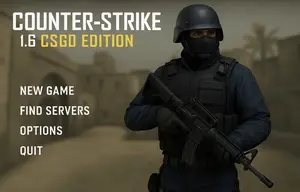
Powered by the unified CS-Down engine with 1-click in-app edition switching and automatic 10–15s mod configuration.
Iconic Global Offensive Loadouts on Zero-Bloat Hardware
CS 1.6 CSGO Edition captures the golden era of Counter-Strike: Global Offensive—featuring iconic skin finishes (Asiimov, Hyper Beast, Karambit Fade, Dragon Lore), padded specialist gloves, GO radar styling, and crisp Global Offensive weapon audio inside a 170 MB installer that runs at 100+ FPS on virtually any Windows laptop.
Inspect animations play cleanly on weapon draw or inspect hotkey without blocking reload cancels or quick-switching after an AWP shot.
Authentic 1.6 Wallbangs & Movement Kept 100% Pure
Unlike bloated Source engine ports that break ladders and bhop physics, CSGO Edition keeps real 1.6 wall penetration, crouch-peeking, and server browser compatibility with thousands of active Dual Protocol 47/48 servers.
Technical Specifications
| Engine Core | GoldSrc Build 8684 (CS:GO Skin & HUD Port) |
|---|---|
| Protocol Compatibility | Dual Protocol 47 / 48 |
| Client Security | Clean Verified Anti-Slowhack Shield |
| Server Discovery | CS:GO-Mod & Classic 1.6 MasterServer |
| Display & Refresh | Full 16:9 / 16:10 Widescreen HUD |
| Offline Bot AI | Offline Practice Bots Pre-Configured |
| Audio Subsystem | GO Weapon Sounds & Radio Pack |
| Disk Footprint | 170 MB Setup (~870 MB Installed) |
Key Features of CS 1.6 CSGO Edition
- ✓ CS:GO weapon skins
- ✓ Custom gloves & HUD
- ✓ Inspect animations
- ✓ Classic 1.6 recoil
Recommended Console Configuration
CS 1.6 CSGO Edition comes pre-configured for optimal performance. Open your in-game console (~) to view or customize these settings:
System Requirements for Windows PC
● Minimum Specifications
- CPU: 800 MHz processor (Intel or AMD)
- RAM: 128 MB RAM (256 MB recommended)
- GPU: 32 MB video card with OpenGL support
- Storage: 800 MB available hard drive space
- OS: Windows XP / Vista / 7 / 8 / 8.1 / 10 / 11
● Recommended Specifications
- CPU: 1.5 GHz multi-core processor
- RAM: 512 MB RAM or higher
- GPU: 128 MB DirectX 9 / OpenGL hardware acceleration
- Storage: 1.2 GB available storage space
- OS: Windows 10 or Windows 11 (24H2 compatible)
Quick Installation Guide
- 1. Download Setup: Click the direct download button above to retrieve
CS-1.6-CSGO-Edition-Setup.exe(170 MB). - 2. Run Installer: Launch the installer and follow the standard on-screen wizard to choose your destination directory.
- 3. Select CS 1.6 CSGO Edition: Open the client from your desktop shortcut. Select CS 1.6 CSGO Edition from the launcher menu with 1 click.
- 4. 10s Auto-Update: The client will configure the edition's custom models, sounds, and server lists automatically in 10–15 seconds.
- 5. Play Online or Practice with Bots: Click "Find Servers" to browse thousands of active community servers, or start a local match to practice offline.
Frequently Asked Questions
How is CS 1.6 CSGO Edition different from CS2 Edition? ▼
CSGO Edition uses classic Global Offensive skins (Karambit, Asiimov, Specialist Gloves) and GO UI styling, whereas CS2 Edition updates HUD elements, sounds, and models to match Counter-Strike 2.
Can low-end PCs that cannot run CS2 still play this edition? ▼
Yes! Because it runs on the lightweight GoldSrc 1.6 engine, even 10-year-old laptops with integrated graphics achieve steady 100+ FPS.
Can I join regular public servers with CS:GO weapon skins? ▼
Yes. Viewmodels are client-side, so your skins display seamlessly on any standard or CS:GO-mod CS 1.6 server.
Related Technical Guides
 Gameplay
CS 1.6 Complete Weapons Mastery & Recoil Control Guide
Master the AK-47, M4A1, AWP, and Desert Eagle. Understand spray patterns, tap-shooting rhythms, first-bullet accuracy, and economy strategy.
 Performance
How to Uncap FPS in CS 1.6 for 144Hz, 240Hz & 360Hz Monitors
Learn how to unlock the 100 FPS GoldSrc engine cap, configure fps_override, eliminate vertical sync tearing, and achieve butter-smooth high refresh rate gameplay.
 Display
CS 1.6 Stretched 4:3 Resolution & Black Bars Fix (NVIDIA, AMD & Intel)
Step-by-step guide to removing side black bars, configuring 4:3 stretched resolution (800x600 & 1024x768), and optimizing GPU display scaling on modern widescreen monitors.